Juan-Fernando Morales (juprmora)
Qingyang Sun (qsun20)
Rohan Nikhil Venkatapuram (rnvenkat)
Project 2B Writeup: Mixed Reality with Physics
Project Description
The goal of this part of the project was to incorporate physics interactions into our first part. However, our first part of the project already had physics interactions so our goal for this was to explore other VR features. Specifically, spatialized audio and using Scene Anchors to spawn elements.
Goals
Our goal was to add spatialized sound to the target breaking as well as adding hoops that take advantage of scene anchor information to only spawn on walls.
Results
We’ll go over the different aspects of the project separately.
Spatialized Sound
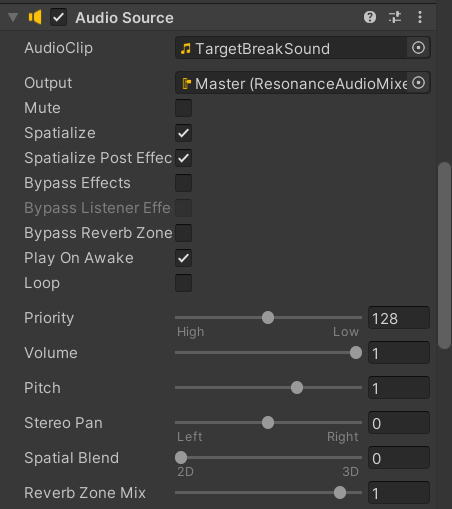
While we were able to incorporate sound, it unfortunately did not come out spatialized. We will go over the process here, as well as any potential reasons for the issues. We decided to try the Google Resonance Audio library. This library is compatible with various platforms and is open source. We decided to utilize this because it would allow us to potentially build for more platforms and devices. This library builds on top of Unity’s built in Audio system. To create a basic sound effect, we need two elements, an Audio Source and an Audio Listener. These two parts correspond to two Unity components of the same name. The Audio Source contains the actual sound effect information and the Audio Listener contains configurations as to how the sound will be received. We placed the Audio Source on the particle system that spawns from breaking the target. Below is an image of the audio source configuration:
There was already an Audio Listener on the Central Eye Anchor of the OVRCameraRig object. You’ll notice that one of the options in this Audio Source component is the Spatialize option. This is supposed to, assuming you’ve added a spatializer component, create spatialized audio. These components were the Resonance Audio Listener and the Resonance Audio Source. These two are attached to the same game objects as their base Unity counterparts. While playing, the sound is made but it does not appear to sound different based on where the player is with respect to the target. Given that Meta Quest comes with its own XR Audio components, it is possible that the quest is incompatible with this library (either that or more settings need to be changed for this to work). It is also possible that there is a step missing in the configuration of the sound.
Spawning in Hoops on Walls
The cubes and targets we’ve spawned in part 1 were spawned independently of the scene information. We wanted to attempt to create spawns that depended on scene information. The way to do this was to create a Prefab Override in our OVR Scene Manager. Previously, we’ve only had two prefabs: one for flat planes and one for furniture. These are defined in the Scene Manager component as scene below:
However, there is also an option to add prefabs that will override one of these two for specific Scene Anchors. These allow us to spawn different kinds of prefabs based on what the object in the scene is. The scene anchor we use here is WALL_FACE, which will allow us to replace walls with different game objects.
This wall prefab has a Hoop Spawner script which contains a function that, when called, spawns a hoop in the center of the wall plane. This function is called from the Hoop Manager script. This script periodically checks if there is a hoop present. If there are no hoops, a wall is randomly selected and its hoop spawn function is called. Each hoop contains a trigger that, when it collides with a cube, destroys the hoop. While the spawning process of this has been tested and verified to work through the Unity Editor, we haven’t yet tested this on the VR Headset.

